RC Services
UVA Research Computing (RC) provides shared HPC and research storage for compute- and data-intensive work. For most data science projects you will use the Rivanna and Afton clusters (scheduled with Slurm) with attached storage options.
Overview: Compute and Storage
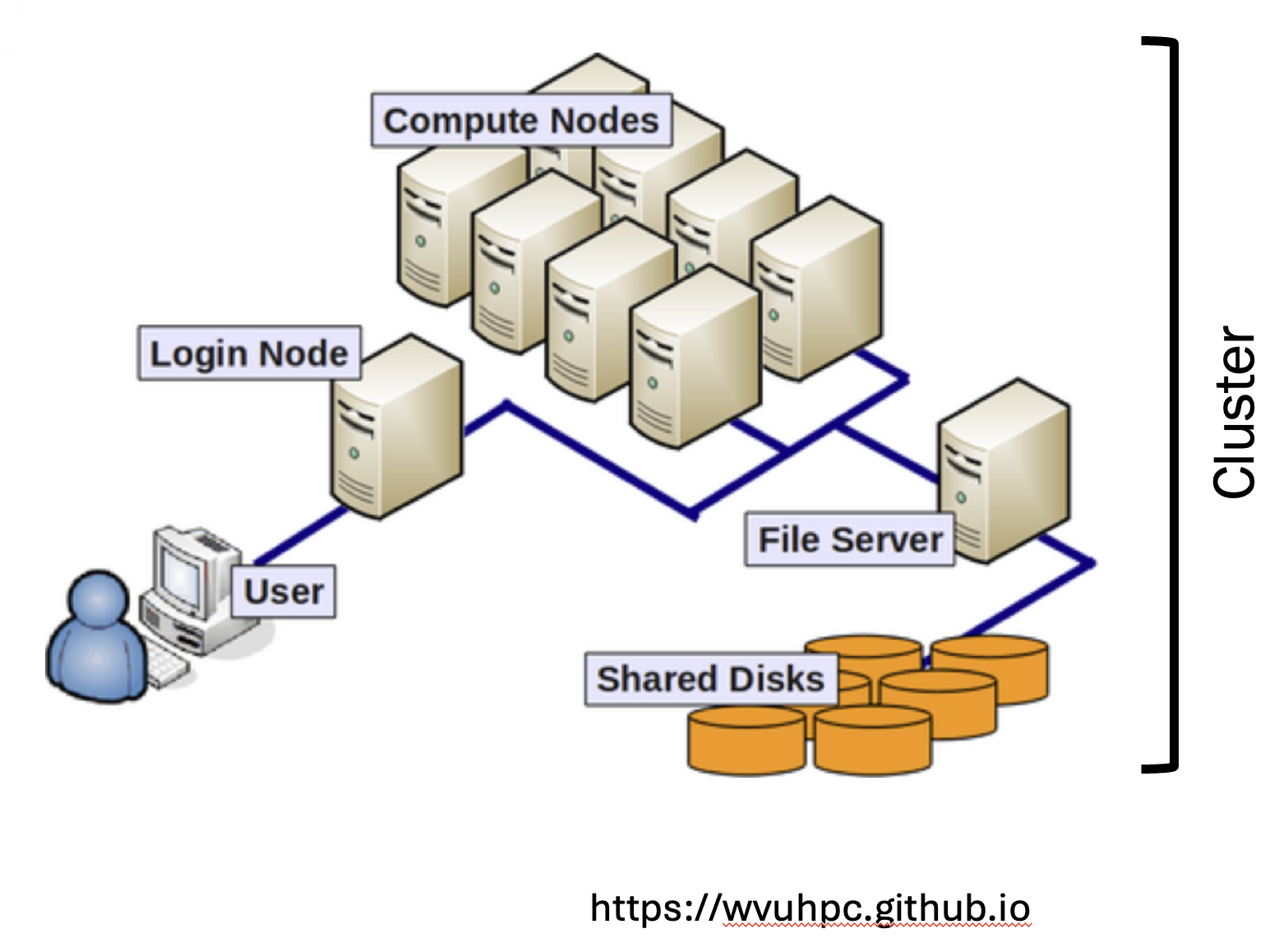
Compute
Rivanna and Afton together offer hundreds of CPU nodes (tens of thousands of cores), large per-node memory (roughly hundreds of GB up to ~1.5 TB), and GPU nodes for ML/DL workloads. Jobs run through Slurm; interactive work (Jupyter, RStudio, VS Code, Desktop) typically uses the interactive partition via the Open OnDemand web portal.
| What you need | Where to start |
|---|---|
| CPU / memory-heavy analysis or training | Batch or interactive jobs on Rivanna/Afton |
| GPU work | gpu or interactive partitions; see GPUs on UVA HPC |
| Short, interactive sessions (code development, debugging) | Open OnDemand apps (interactive queue; time and resource limits apply) |
Access is allocation-based. Compute time is measured in service units (SUs) (roughly core-hours; GPUs cost more). Common allocation types:
- Standard: free, renews about yearly, normal queue priority
- Purchased: paid SUs, higher priority, do not expire
- Instructional: free, limited SUs for teaching only, lowest queue priority; typically expire about two weeks after the class or training ends
- Dedicated computing: paid, provides exclusive access to nodes of a specific hardware type.
Only faculty can request an allocation. They can add students to the allocation as needed.
Links:
Storage
Several storage options are available on Rivanna and Afton.
| Location | Quota (typical) | Provisioned | Best for | Caveats |
|---|---|---|---|---|
/home | 200 GB, free | Automatic with your HPC account | Scripts, notebooks, light interactive work | Personal only; not ideal for large Slurm I/O |
/scratch | 10 TB, free | Automatic with your HPC account | Active job inputs/outputs (fast parallel FS) | Personal; no backups; files unused ~90 days are deleted |
/project | Leased (1 TB+) | Optional; purchased by faculty PI | Shared group data and running HPC jobs | Research Project storage; snapshots; paid |
/standard | Leased (1 TB+); PIs may get up to 10 TB free | Optional; requested by faculty PI | Longer-term shared results | Research Standard; slower; don’t run jobs here |
None of the RC storage offerings provide backups. You should transfer important data to other storage locations on a regular basis.
Only PIs (faculty) can lease or expand group storage via the storage request form. Students cannot place storage change requests.
Full comparison: Storage options
Practical pattern
- Keep code and small configs in
/home(or a shared/projectpath). - Stage large data and write job output to
/scratch(or/projectif your group has it). - Copy important data to
/project,/standard, or other storage systems before automatic scratch cleanup deletes them.
Globus is the recommended way to move large datasets between your laptop, cloud or lab storage, and HPC-mounted paths (/home, /scratch, /project, /standard). Use the managed collection UVA Standard Security Storage in the Globus File Manager; for a local machine, install Globus Connect Personal first.
Alternatively, you can use familiar command-line tools such as scp, rsync, rclone, or the AWS CLI.
Working with controlled-access, regulated, or otherwise highly sensitive data
Controlled-access, regulated, or otherwise highly sensitive data must not be processed on Afton/Rivanna. Use RC’s high-security offerings instead (Ivy virtual machines and Rio HPC). When in doubt, ask the RC team which option fits your use case.
Other RC services
Beyond Rivanna/Afton HPC and storage, Research Computing also offers consulting and platform services that many data science projects use alongside the cluster. Browse the full catalog on RC Services. Highlights include:
- UVA RC GenAI: generative AI tools for UVA research
- Research Application Services: supported containerized / microservice application hosting
- Data Analytics Center: collaborative analysis support, including AI applications
Don’t know where to start?
Reach out to the RC team for technical support and consultations. See the Getting help page for details.