Prefect
Table of contents
What is Prefect?
Prefect is a modern workflow orchestration platform designed for building, running, and monitoring data workflows. It was created by Prefect Technologies, Inc. and provides a Python-native approach to workflow automation with a focus on developer experience, observability, and reliability.
Prefect is open-source software, with the core Prefect engine available under the Apache 2.0 license. Prefect also offers Prefect Cloud, a managed service for workflow orchestration, and Prefect Server, a self-hosted option for organizations that need more control.
It is particularly well-suited for:
Data Engineering: ETL/ELT pipelines, data processing workflows
Data Analytics: Automated reporting, data quality checks
ML Operations: Model training pipelines, feature engineering
DevOps: Automated deployments, infrastructure management
Key features of Prefect include:
Python-native: Workflows are defined as Python code using decorators and functions
Dynamic workflows: Support for conditional logic, loops, and dynamic task generation
Observability: Built-in dashboard for monitoring workflow runs, logs, and metrics
Flexible execution: Run workflows locally, on Prefect Cloud, or self-hosted Prefect Server
Error handling: Automatic retries, failure notifications, and state management
Scheduling: Built-in scheduling with cron expressions or interval-based triggers
Setup
Installation
Install Prefect using pip:
pip install prefect
Or using conda:
conda install -c conda-forge prefect
For executing shell commands, also install the prefect-shell package:
pip install prefect-shell
Verify that Prefect is installed correctly:
prefect version
Prefect Server
You have three options to observe Prefect workflow execution:
- Local Prefect Server
- SDS Prefect Server
- Prefect Cloud Server
Local Prefect Server
You can start a local Prefect UI server on your own computer to monitor workflows. This is useful for local development.
prefect server start
This will start a local Prefect server and open the UI at http://localhost:4200.
Using SDS Prefect Server
SDS is running a Prefect server instance at: https://sds-prefect.pods.uvarc.io/dashboard. This server can be used for monitoring workflows running on your own computer or UVA’s shared computing resources like the Afton/Rivanna HPC systems, or the SDS Kubernetes environment. You need to set up a new profile with these commands:
prefect profile create uvasds
prefect profile use uvasds
prefect config set PREFECT_API_URL=<REACH_OUT_TO_N.MAGEE>
prefect config set PREFECT_API_KEY=<REACH_OUT_TO_N.MAGEE>
Your profile is added to ~/.prefect/profile.toml. You can have many profiles and switch between them using the prefect profile use <NAME> command.
Using Prefect Cloud
If you prefer to use Prefect Cloud (the managed service), you’ll need to:
- Sign up for a free account at app.prefect.cloud
- Authenticate your local environment:
prefect cloud login
- Create a workspace in Prefect Cloud
- Set your workspace:
prefect cloud workspace set --workspace <your-workspace-name>
Once Prefect is installed and configured, you can:
- Create your first workflow (see “A simple Workflow” section below)
- Explore the Prefect UI to monitor workflow runs
- Check out the example scripts in the examples folder
Getting Started
Of Tasks and Flows
Prefect workflows are built from two fundamental building blocks: tasks and flows.
Tasks are the individual units of work in a Prefect workflow. They represent discrete operations, such as extracting data, transforming it, or loading it into a database. Tasks are created by applying the @task decorator to a Python function. When you call a task function within a flow, Prefect tracks its execution, manages its state, and provides observability features like logging and retries.
Flows combine a group of tasks into a structured pipeline. A flow is created by applying the @flow decorator to a Python function. Flows coordinate task execution, manage dependencies between tasks, and provide the overall workflow context.
Tasks and flows are chained together through function calls. When you call a task function inside a flow function, Prefect automatically creates a dependency relationship. The output of one task becomes the input to the next, creating a directed acyclic graph (DAG) of task dependencies. Prefect uses these dependencies to determine execution order: tasks that don’t depend on each other can run concurrently, while dependent tasks execute sequentially.
For example, if task B requires the output of task A, Prefect ensures task A completes before task B begins. This dependency chaining happens naturally through Python function calls—no special syntax is needed beyond the @task and @flow decorators.
A simple Workflow
Assuming that you’re in the top level directory of the cloned GitHub repo, change to the examples folder with this command:
cd examples/prefect
Here’s a basic Prefect workflow that processes data:
import random
import numpy as np
from time import sleep

from prefect import task, flow

# Define a set of functions as tasks
# Adding the @task decorator is all it takes.
@task
def get_number(min=1, max=100) -> int:
    """Return a random number n, with min<=n<max"""
    sleep(1)  # simulate longer processing
    return random.randint(min, max)

@task
def add(n1: int, n2: int) -> int:
    """Return sum of two numbers"""
    sleep(1.5)  # simulate longer processing
    return n1 + n2

@task
def multiply(n1: int, n2: int) -> int:
    """Return product of two numbers"""
    sleep(1)  # simulate longer processing
    return n1 * n2

@task
def mean(*args: int) -> float:
    """Return the mean of provided numbers"""
    sleep(3)  # simulate longer processing
    return np.mean(args)

# Define a function as flow that encapsulates a set of tasks
@flow
def analysis():
    """Return results of some arbitrary calculations"""
    n1 = get_number()
    n2 = get_number()
    temp_sum = add(n1, n2)
    n3 = get_number()
    r = multiply(n3, temp_sum)
    m = mean(n1, n2, n3)
    return r, m

if __name__ == "__main__":
    r, m = analysis()
    print(f"arbitrary calc: r={r}, mean={m}")
Run this with: python examples/prefect/numbers.py, or view the notebook at examples/prefect/numbers.ipynb. The output should look similar to this:
16:08:59.356 | INFO    | Flow run 'crouching-kittiwake' - Beginning flow run 'crouching-kittiwake' for flow 'analysis'
16:08:59.366 | INFO    | Flow run 'crouching-kittiwake' - View at https://sds-prefect.pods.uvarc.io/runs/flow-run/96b5b5d8-0d90-4390-80b2-e948d85d9cdd
16:09:00.449 | INFO    | Task run 'get_number-3a9' - Finished in state Completed()
16:09:01.482 | INFO    | Task run 'get_number-077' - Finished in state Completed()
16:09:03.015 | INFO    | Task run 'add-fe8' - Finished in state Completed()
16:09:04.054 | INFO    | Task run 'get_number-496' - Finished in state Completed()
16:09:05.088 | INFO    | Task run 'multiply-dc3' - Finished in state Completed()
16:09:08.129 | INFO    | Task run 'mean-2b8' - Finished in state Completed()
16:09:08.169 | INFO    | Flow run 'crouching-kittiwake' - Finished in state Completed()
arbitrary calc: r=4320, mean=47.0
Visualizing the task graph and execution
When you execute functions decorated with @task/@flow the execution will be monitored by a Prefect Server instance. The specific instance is based on the active profile set in your ~/.prefect/profiles.toml file.
You will see a URL pointing to the Prefect Server instance in the standard output.

Notice how the tasks are executed sequentially based on the order of invocation in the encapsulating flow function.
Concurrent Task Execution
We can convert the above script for concurrent task execution by using submit() when invoking our task functions (technically, our task functions have been wrapped into callable objects with a submit method, but that’s syntactic sugar).
So let’s add these changes:
- Rename our flow to “concurrent analysis”,
- redirect all print statements to be collected as Prefect logs,
- and
submiteach function for concurrent execution.
@flow(name="concurrent analysis", log_prints=True)
def analysis():
    """Return results of some arbitrary calculations"""
    n1 = get_number.submit()
    n2 = get_number.submit()
    temp_sum = add.submit(n1, n2)
    n3 = get_number.submit()
    r = multiply.submit(n3, temp_sum)
    m = mean.submit(n1, n2, n3)
    return r, m
You can find the updated code in examples/prefect/numbers-concurrent.py, or the corresponding notebook at examples/prefect/numbers-concurrent.ipynb
After running the script/notebook, check the task graph and execution timing in the Prefect Server instance.
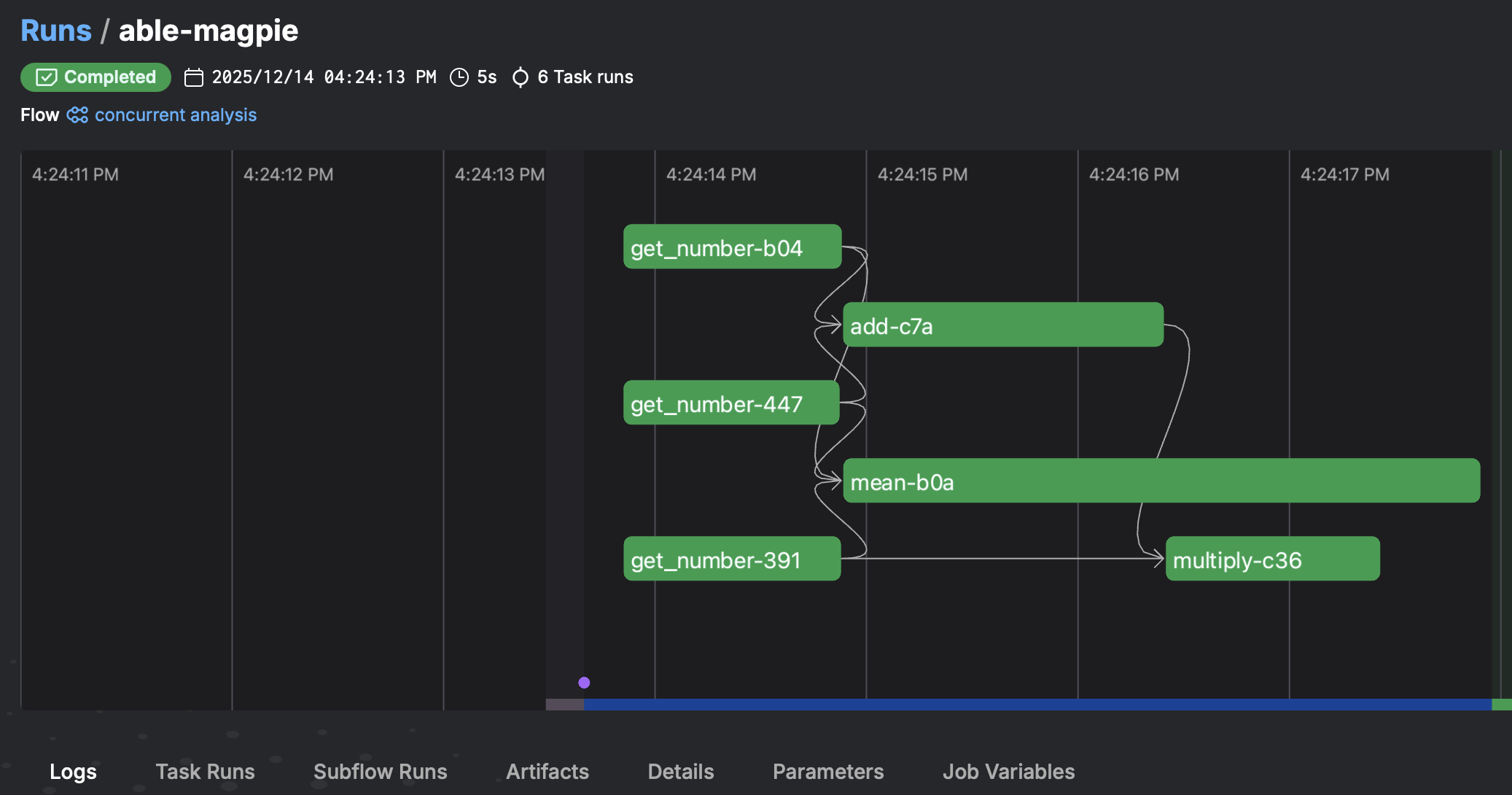
Notice how Prefect orchestrated the concurrent execution for tasks that have no dependency on each other: i.e. temporal overlap of the get_number functions, and the overlap of the mean function with the add and multiply functions.
Prefect provides several integrations for controlling task concurrency. See Advanced Topics > Task Runners for details.
Timeouts
Add timeouts to prevent tasks from running indefinitely:
from prefect import flow, task
from prefect.tasks import task_input_hash
import time

@task(timeout_seconds=5)
def extract_data():
    """Extract data from a source."""
    time.sleep(2)  # Simulate work
    return [1, 2, 3, 4, 5]

@task(timeout_seconds=10)
def transform_data(data):
    """Transform the data."""
    time.sleep(1)  # Simulate work
    return [x * 2 for x in data]

@task(timeout_seconds=5)
def load_data(transformed_data):
    """Load the transformed data."""
    time.sleep(1)  # Simulate work
    print(f"Loaded data: {transformed_data}")
    return len(transformed_data)

@flow
def data_pipeline():
    """A pipeline with timeout protection."""
    data = extract_data()
    transformed = transform_data(data)
    result = load_data(transformed)
    return result

if __name__ == "__main__":
    result = data_pipeline()
Restart Failed Tasks
Configure automatic retries for failed tasks:
from prefect import flow, task
import random

@task(retries=3, retry_delay_seconds=2)
def extract_data():
    """Extract data with potential failures."""
    if random.random() < 0.3:  # 30% chance of failure
        raise Exception("Extraction failed!")
    return [1, 2, 3, 4, 5]

@task(retries=2, retry_delay_seconds=1)
def transform_data(data):
    """Transform the data."""
    return [x * 2 for x in data]

@task(retries=2)
def load_data(transformed_data):
    """Load the transformed data."""
    print(f"Loaded data: {transformed_data}")
    return len(transformed_data)

@flow
def data_pipeline():
    """A resilient pipeline with retry logic."""
    data = extract_data()
    transformed = transform_data(data)
    result = load_data(transformed)
    return result

if __name__ == "__main__":
    result = data_pipeline()
Cache workflow outputs
Cache task results to avoid recomputing expensive operations:
from prefect import flow, task
from prefect.tasks import task_input_hash
import time

@task(cache_key_fn=task_input_hash, cache_expiration_seconds=3600)
def extract_data(source: str):
    """Extract data - results are cached based on input."""
    print(f"Extracting from {source}...")
    time.sleep(2)  # Simulate expensive operation
    return [1, 2, 3, 4, 5]

@task(cache_key_fn=task_input_hash)
def transform_data(data, multiplier: int):
    """Transform data - cached based on data and multiplier."""
    print(f"Transforming with multiplier {multiplier}...")
    time.sleep(1)
    return [x * multiplier for x in data]

@task
def load_data(transformed_data):
    """Load the transformed data."""
    print(f"Loaded data: {transformed_data}")
    return len(transformed_data)

@flow
def data_pipeline(source: str = "database", multiplier: int = 2):
    """A pipeline with cached intermediate results."""
    data = extract_data(source)
    transformed = transform_data(data, multiplier)
    result = load_data(transformed)
    return result

if __name__ == "__main__":
    # First run - tasks execute
    result1 = data_pipeline("database", 2)

    # Second run with same inputs - uses cached results
    result2 = data_pipeline("database", 2)

    # Different inputs - tasks execute again
    result3 = data_pipeline("database", 3)
Event Driven Computing
Execute code based on task or workflow state changes:
from prefect import flow, task
from prefect.events import emit_event
import random

@task
def extract_data():
    """Extract data and emit an event."""
    data = [1, 2, 3, 4, 5]
    emit_event(
        event="data.extracted",
        resource={"prefect.resource.id": "extract-task"},
        payload={"count": len(data)}
    )
    return data

@task
def transform_data(data):
    """Transform data and emit events."""
    transformed = [x * 2 for x in data]

    # Emit event on success
    emit_event(
        event="data.transformed",
        resource={"prefect.resource.id": "transform-task"},
        payload={"count": len(transformed)}
    )
    return transformed

@task
def load_data(transformed_data):
    """Load data and emit completion event."""
    print(f"Loaded data: {transformed_data}")

    emit_event(
        event="data.loaded",
        resource={"prefect.resource.id": "load-task"},
        payload={"count": len(transformed_data)}
    )
    return len(transformed_data)

@flow
def data_pipeline():
    """A pipeline with event-driven capabilities."""
    try:
        data = extract_data()
        transformed = transform_data(data)
        result = load_data(transformed)

        # Emit workflow completion event
        emit_event(
            event="pipeline.completed",
            resource={"prefect.resource.id": "data-pipeline"},
            payload={"items_processed": result}
        )
        return result
    except Exception as e:
        # Emit failure event
        emit_event(
            event="pipeline.failed",
            resource={"prefect.resource.id": "data-pipeline"},
            payload={"error": str(e)}
        )
        raise

if __name__ == "__main__":
    result = data_pipeline()
    print(f"Pipeline completed. Processed {result} items.")
Note: Events can trigger automations in Prefect Cloud or be consumed by external systems for monitoring, alerting, or triggering downstream workflows.
Executing other applications via Shell commands
Prefect can execute shell commands and external applications using ShellOperation from the prefect-shell package:
from prefect import flow
from prefect_shell import ShellOperation

@flow
def shell_workflow(filename: str = "data.txt"):
    """A workflow that executes shell commands using ShellOperation."""

    # Simple command execution
    echo_task = ShellOperation(
        commands=["echo 'Hello from Prefect!'"],
        stream_output=True
    )
    echo_result = echo_task()
    print(f"Echo output: {echo_result}")

    # Process file with external tool (e.g., count lines)
    wc_task = ShellOperation(
        commands=[f"wc -l {filename}"],
        stream_output=True
    )
    wc_result = wc_task()
    line_count = int(wc_result.split()[0])
    print(f"File {filename} has {line_count} lines")

    # Run multiple commands in sequence
    system_info_task = ShellOperation(
        commands=[
            "date",
            "pwd",
            "ls -la"
        ],
        stream_output=True
    )
    system_info = system_info_task()
    print("System information:")
    print(system_info)

    # Execute command with environment variables
    env_task = ShellOperation(
        commands=["echo $MY_VAR"],
        env={"MY_VAR": "Prefect is awesome!"},
        stream_output=True
    )
    env_result = env_task()
    print(f"Environment variable: {env_result}")

    return {
        "echo_output": echo_result,
        "line_count": line_count,
        "system_info": system_info,
        "env_result": env_result
    }

if __name__ == "__main__":
    result = shell_workflow("example.txt")
Advanced shell operation with working directory and error handling:
from prefect import flow
from prefect_shell import ShellOperation

@flow
def advanced_shell_workflow():
    """Advanced shell operations with custom working directory."""

    # Run command in specific directory
    build_task = ShellOperation(
        commands=["make build"],
        working_dir="/path/to/project",
        stream_output=True,
        return_all=True  # Return both stdout and stderr
    )
    build_result = build_task()

    # Chain multiple commands with error handling
    pipeline_task = ShellOperation(
        commands=[
            "python process_data.py",
            "python validate.py",
            "python upload.py"
        ],
        stream_output=True,
        continue_on_error=False  # Stop on first error
    )
    pipeline_result = pipeline_task()

    return {
        "build": build_result,
        "pipeline": pipeline_result
    }

if __name__ == "__main__":
    result = advanced_shell_workflow()
Key points:
ShellOperationis a Prefect task that executes shell commands- Use
commandsparameter to specify one or more shell commands - Set
stream_output=Trueto see command output in logs - Use
working_dirto execute commands in a specific directory - Use
envto set environment variables for the command - Set
continue_on_error=Falseto stop execution on command failure - Prefect automatically tracks execution, handles retries, and manages errors
All Example Scripts
You can find the example scripts and notebooks in the examples folder in the Git repository.
In addition, take a look at the official Prefect example collection under Additional Resources
Advanced Topics
TaskRunners
By default Prefect uses a thread pool to execute tasks and flows. Alternatively, you may choose a process pool which can be advantageous, particularly with older Python versions that employ the global interpreter lock on CPU-bound tasks.
In addition, Prefect offers integrations with dask and ray for distributed task execution beyond single nodes. See the Prefect TaskRunner documentation for details.
Work pools deployments
Workflow tasks often have different compute requirements—some need high-memory resources, others require GPU acceleration, and some can run on minimal resources. Using a single compute configuration for all tasks can be inefficient, leading to wasted resources or insufficient capacity for demanding tasks.
Prefect’s deployment system addresses this by allowing you to configure work pools that match your specific infrastructure needs. You can deploy workflows across a wide variety of execution environments, including:
- Container platforms: Docker, Kubernetes, ECS, and other containerized environments
- Cloud services: AWS, Azure, GCP compute resources
- HPC systems: High-performance computing clusters for intensive workloads
- Prefect-managed infrastructure: Prefect Cloud’s managed execution options
This flexibility enables you to optimize resource usage (and cost) by matching each task to the most appropriate compute environment.
Exporting Flow Configuration as Declarative Artifacts
Prefect allows you to export flow configurations and parameters in human-readable formats (YAML or JSON) that serve as declarative artifacts. These artifacts capture the complete workflow definition, including task configurations, dependencies, parameters, schedules, and deployment settings, enabling you to rebuild and execute the exact same flow elsewhere.
Why declarative artifacts matter:
- Reproducibility: Export your flow configuration to recreate the exact workflow in different environments
- Version control: Track workflow changes by versioning the exported configuration files
- Portability: Share workflow definitions with team members or deploy to different systems
- Documentation: Human-readable YAML/JSON files serve as self-documenting workflow specifications
- Infrastructure as Code: Treat workflows as code that can be reviewed, tested, and deployed systematically
Exporting a deployment configuration:
When you create a deployment, Prefect generates a declarative configuration that can be exported:
from prefect import flow
from prefect.deployments import Deployment

@flow
def my_workflow(param1: str, param2: int = 10):
    # Your workflow code
    pass

# Create a deployment
deployment = Deployment.build_from_flow(
    flow=my_workflow,
    name="my-deployment",
    description="A sample deployment for data processing workflow",
    tags=["production", "data-pipeline"],
    parameters={"param1": "value1", "param2": 20},
    work_pool_name="my-work-pool"
)

# Export to YAML
deployment.to_yaml("deployment.yaml")
The exported deployment.yaml file contains:
name: my-deployment
description: A sample deployment for data processing workflow
version: null
tags:
  - production
  - data-pipeline
parameters:
  param1: value1
  param2: 20
work_pool:
  name: my-work-pool
  job_variables: {}
flow_name: my_workflow
Key fields explained:
description: Human-readable description of the deployment for documentation and organizationtags: List of tags for filtering, organizing, and grouping deployments (e.g.,["production", "data-pipeline"])version: Optional version identifier (arbitrary string like"1.0.0"or"v2024-01-15"). You can use semantic versioning, timestamps, or Git commit hashes to track deployment versions. This is not automatically generated—you set it manually when creating the deploymentparameters: Default parameter values for the flow that can be overridden at runtimejob_variables: Execution-specific variables passed to the work pool infrastructure (e.g., Kubernetes pod specs, Docker container environment variables, resource limits). These are typically set based on the work pool type and execution environment requirements
Rebuilding from exported configuration:
You can recreate a deployment from the exported YAML file:
from prefect.deployments import Deployment

# Load deployment from YAML
deployment = Deployment.load_from_yaml("deployment.yaml")

# Apply the deployment
deployment.apply()
Exporting flow definitions:
You can also export flow metadata and structure:
from prefect import flow

@flow
def my_workflow(param1: str, param2: int = 10):
    # Your workflow code
    pass

# Get flow definition as dictionary
flow_spec = my_workflow.model_dump()

# Export to JSON for human-readable format
import json
with open("flow_definition.json", "w") as f:
    json.dump(flow_spec, f, indent=2)
Best practices:
- Version your exports: Include version numbers or timestamps in exported configuration filenames
- Store in version control: Commit exported YAML/JSON files to Git for workflow versioning
- Document parameters: Include parameter descriptions and default values in your flow definitions
- Test imports: Verify that exported configurations can be successfully imported and deployed
- Use for CI/CD: Integrate configuration exports into your deployment pipelines for automated workflow deployment
This declarative approach ensures that your workflows are reproducible, portable, and maintainable across different environments and teams.
Automations
Prefect Automations allow you to create event-driven workflows that respond to flow run states, task completions, and other triggers. Automations can send notifications, trigger other flows, or perform custom actions based on workflow execution events.
See the Prefect Automations guide for details on creating and managing automations.
Useful integrations
Prefect offers a wide range of integrations through prefect-* packages that extend functionality for cloud services, data processing, parallelization, and more. Install these packages separately as needed.
Cloud Providers
prefect-aws- Integration with Amazon Web Services (S3, ECS, Lambda, etc.)prefect-azure- Integration with Microsoft Azure (Blob Storage, Container Instances, etc.)prefect-gcp- Integration with Google Cloud Platform (GCS, BigQuery, Cloud Run, etc.)prefect-docker- Docker container execution and management
Parallelization & Distributed Computing
prefect-dask- Distributed computing with Dask for parallel task executionprefect-ray- Distributed execution using Ray for scalable parallel processing
Data Storage & Databases
prefect-sqlalchemy- Database connectivity using SQLAlchemyprefect-snowflake- Snowflake data warehouse integrationprefect-dbt- Integration with dbt (data build tool) for analytics engineering workflowsprefect-bigquery- Google BigQuery integrationprefect-postgres- PostgreSQL database integrationprefect-redis- Redis database integration
Other Common Integrations
prefect-github- GitHub API integration for repository and workflow managementprefect-slack- Slack notifications and messagingprefect-databricks- Databricks platform integrationprefect-kubernetes- Kubernetes job execution and management
Installation:
Install integrations using pip:
pip install prefect-aws
Or install multiple at once:
pip install prefect-aws prefect-dask prefect-sqlalchemy
Full List of Integrations:
You can find a complete list of all available Prefect integrations in the Official Prefect Integrations Catalog.
Additional Resources
Official Documentation
- Prefect Documentation - Comprehensive guides, API reference, and tutorials
- Prefect Blog - Articles, best practices, and case studies
- Prefect Discourse - Community forum for questions and discussions
Learning Resources
- Prefect Tutorials - Step-by-step tutorials for common use cases
- Prefect Examples - Official example workflows and patterns
- Prefect YouTube Channel - Video tutorials and webinars
Community
- Prefect GitHub Repository - Source code, issues, and contributions
- Prefect Slack Community - Real-time community support
Related Tools
- Prefect Cloud - Managed workflow orchestration service
- Prefect Server - Self-hosted Prefect server option
- Prefect Agents - Execution infrastructure for workflows